Live Connection Inspector & Protocols
Inspect every active and recent connection by signed app, L7 protocol, and SNI/Host, view 60-second per-flow throughput graphs, and send AI API flows straight into Failover.
Navigating the Live Inspector
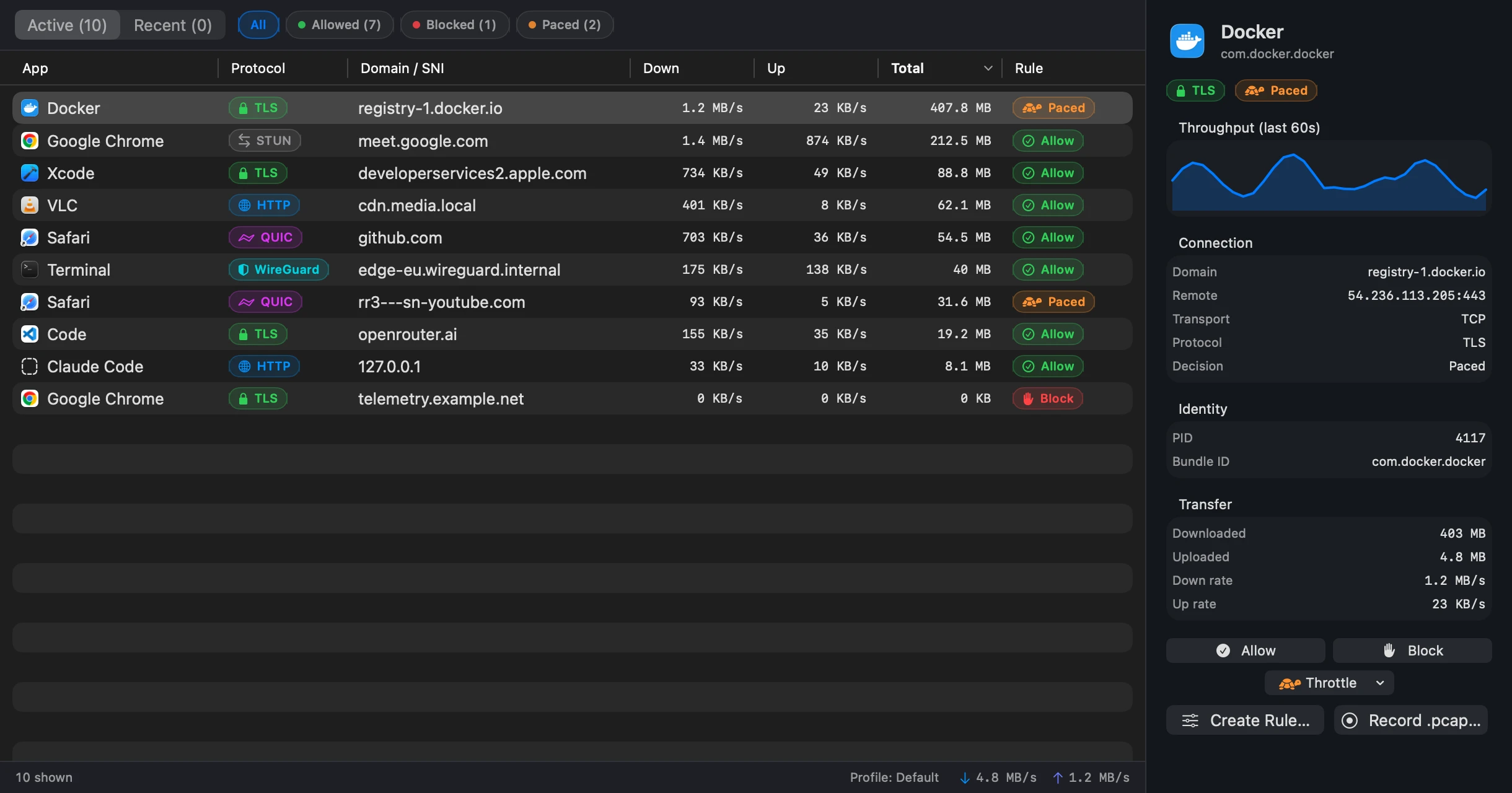
Open Netspector Inspector anytime from the Menu Bar popover or by pressing ⇧⌘I. Signed process verification maps connections—including background helpers and CLI tools—back to their parent macOS application bundle.
Searching, Freezing & Context Menu Actions
- Toolbar Search: Filters across app name, domain/SNI, bundle ID, process name, L7 protocol, and remote IP simultaneously.
- Pause / Resume: Freezes table row updates while you inspect a fast-moving connection without interrupting network traffic.
- Clear (⌘K): Clears the transient Recent list in memory; does not delete saved rules or SQLite usage history.
- Right-Click Context Menu: Right-click any row to Allow, Block, or Throttle (
100 KB/s,500 KB/s,1 MB/s) that app + domain pair, open Create Custom Rule…, start Record .pcapng, or copy Domain, Remote Endpoint, or Bundle ID. - Known AI Provider Shortcut: When you select a flow to a recognized AI host (
api.anthropic.com,api.openai.com,openrouter.ai,api.deepseek.com,api.groq.com,generativelanguage.googleapis.com), the detail pane offers a direct button to configure or view that endpoint in AI Failover.
Supported Protocols & Cleartext SNI Inspection
Netspector's C99 inspection engine (LibZapretCore) classifies connections from the opening <= 4 KB of handshake metadata in RAM without installing a root CA or decrypting payloads.
| Badge | Transport | What Netspector Extracts | Typical Apps |
|---|---|---|---|
| TLS | TCP | ClientHello SNI hostname | Browsers, Docker, Xcode, CLI tools |
| QUIC (HTTP/3) | UDP | QUIC v1/v2 Initial decrypted-in-spec SNI | Safari, Chrome, YouTube, Cloudflare |
| HTTP | TCP | Cleartext Host header | Local servers, package registries, LAN |
| DTLS | UDP | DTLS ClientHello fingerprint | WebRTC media & encrypted UDP tunnels |
| WireGuard | UDP | WireGuard handshake initiation | VPN clients, Terminal tunnels |
| STUN | UDP | STUN binding request / response | Google Meet, Zoom, Discord voice |
| DNS | UDP / TCP | DNS query / response header | Resolvers, mDNSResponder |
| Discord | UDP | Discord voice discovery packet | Discord desktop audio |
| XMPP | TCP | XMPP XML stream header | Messaging clients |
| MTProto | TCP | MTProto transport signature | Telegram clients |
| DHT / BitTorrent / uTP BT | UDP / TCP | P2P handshake & uTP framing | Torrent & P2P sync tools |
When a row displays No SNI (direct IP / ECH) with a slashed-eye icon beside the IP address, the client either connected directly to a raw IP without a hostname or used Encrypted Client Hello (ECH) so the SNI was not sent in cleartext. Netspector never tries to break ECH encryption.