
AI Failover Gateway: Routes, Endpoints & Policies
Configure a local 127.0.0.1 BYOK switchboard with drag-and-drop failover chains, automatic Anthropic ↔ OpenAI translation, Apple Keychain secrets, and smart circuit breakers.
Zero-Cloud Loopback Switchboard Architecture
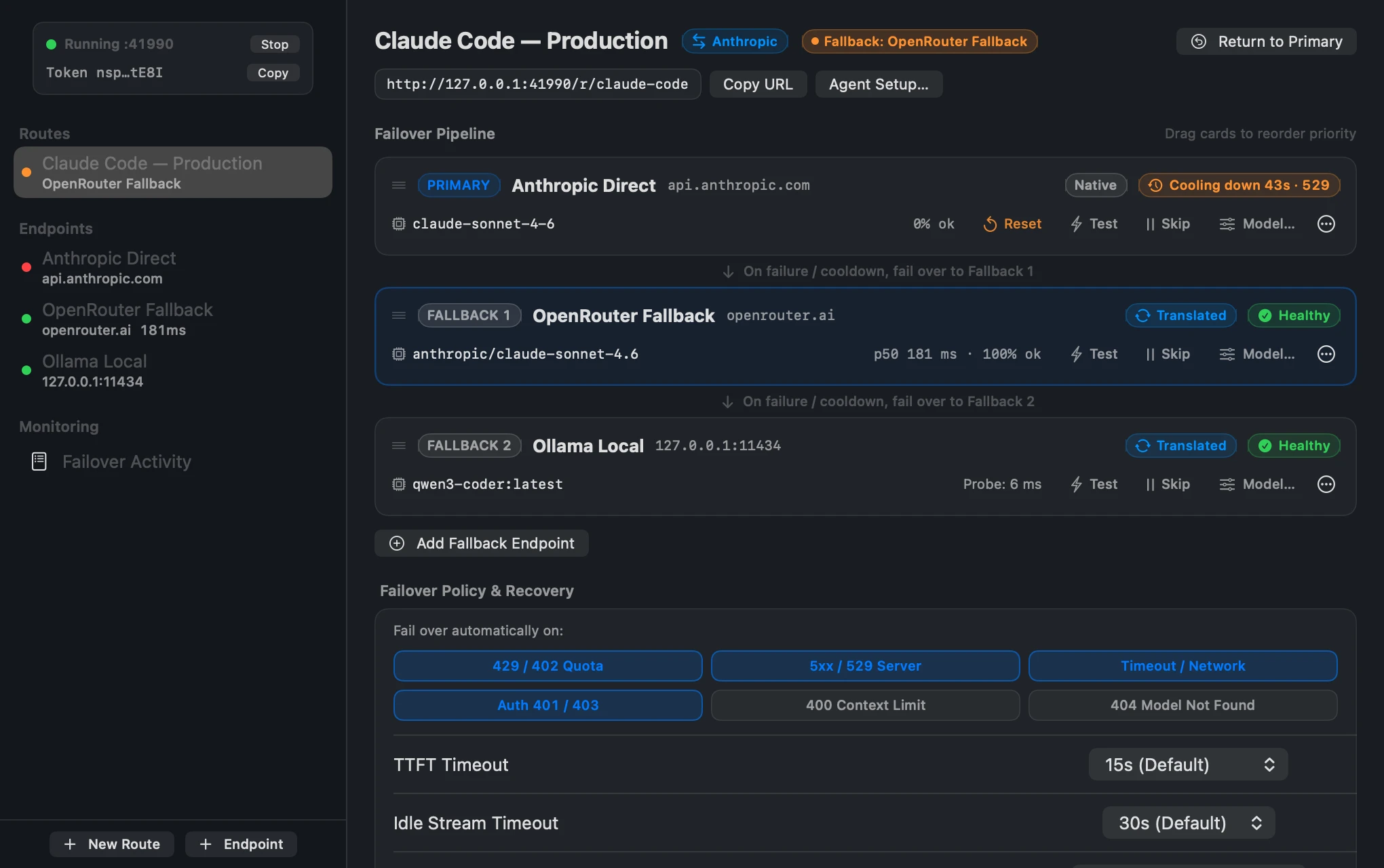
Open AI Failover (⇧⌘A) to manage routes and upstream AI providers. The gateway binds exclusively to 127.0.0.1 / ::1 (default port 41990), enforces a Keychain-backed local bearer token, rejects cross-origin browser requests with HTTP 403, and keeps all prompt and response payloads strictly in memory—nothing is ever written to disk or sent to Netspector servers.
Adding BYOK & Local Model Endpoints
Click + Endpoint (⇧⌘N) to add cloud providers or local model servers. Netspector includes 10 built-in Quick Presets so base URLs, default models, and authentication header styles (Authorization: Bearer, x-api-key, or None) are pre-filled accurately.

| Preset | Protocol | Default Base URL | Auth Style |
|---|---|---|---|
| OpenAI | OpenAI Chat | https://api.openai.com/v1 | Bearer |
| Anthropic | Anthropic Messages | https://api.anthropic.com | x-api-key |
| OpenRouter | OpenAI Chat | https://openrouter.ai/api/v1 | Bearer |
| DeepSeek | OpenAI Chat | https://api.deepseek.com/v1 | Bearer |
| Groq | OpenAI Chat | https://api.groq.com/openai/v1 | Bearer |
| Together | OpenAI Chat | https://api.together.xyz/v1 | Bearer |
| Gemini | OpenAI Chat | https://generativelanguage.googleapis.com/v1beta/openai | Bearer |
| Ollama | OpenAI Chat | http://127.0.0.1:11434/v1 | None |
| LM Studio | OpenAI Chat | http://127.0.0.1:1234/v1 | None |
| Custom | OpenAI / Anthropic | https://api.example.com/v1 | Configurable |
Protocol Translation, Model Overrides & Thinking Safety
When a route's incoming client protocol (Anthropic Messages) differs from a fallback target's protocol (OpenAI Chat Completions), Netspector marks the target Translated and converts requests and streaming Server-Sent Events (SSE) on the fly—including text, tool calls (tool_use ↔ tool_calls), images, and finish reasons.
When failing over across providers, account-bound extras such as Anthropic thinking signatures and prompt-cache markers cannot be verified by a different provider. Click Model… on any target card to keep Strip account-bound thinking blocks on fallback enabled and configure per-tier rewrites.
Click Model… on any target card to control which upstream model ID is sent. Netspector resolves model names in this exact precedence order: Tier Rules (e.g. haiku → gpt-4.1-mini) → Model Override → Pass-Through client model → Endpoint Default.
Circuit Breakers, Recovery Modes & Testing
- Pre-Stream Failover Only: Failover happens before the first SSE frame commits to your coding agent. Once streaming begins, an idle stream timeout triggers recovery on the next request without corrupting the current stream.
- TTFT & Idle Timeouts: Set TTFT Timeout (
10s,15s Default,30s,60s Reasoning,90s) for slow thinking models, and Idle Stream Timeout (15s–120s) to catch stalled streams. - Recovery Modes: Stick Until Idle (
2m/5m/10m) stays on the healthy fallback during active coding bursts before probing Primary again; Auto-Return (1m/2m/5m) probes after cooldown; Manual Only waits until you click Return to Primary. - Test Chain & Simulate Outage: Use Test Chain in the route toolbar to probe every target, or Simulate Outage to force-skip Primary and verify your fallback chain live without waiting for a real provider outage.