
HTTP/3 QUIC SNI & 13+ protocols without a root CA
Yes, zero root CA- Binary Firewalls
- App & DNS only
- Quota Cutoffs
- Usage counters only
- Cloud AI Routers
- N/A
See every app and domain talking in real time. Turn noisy downloads down to a whisper without dropping a call. Keep Claude Code and Codex streaming on 127.0.0.1 when an AI provider goes down—all on your Mac, with no root certificate and no cloud.
Feels like part of macOS—instant to open, quiet in your menu bar, and built to stay out of your way.
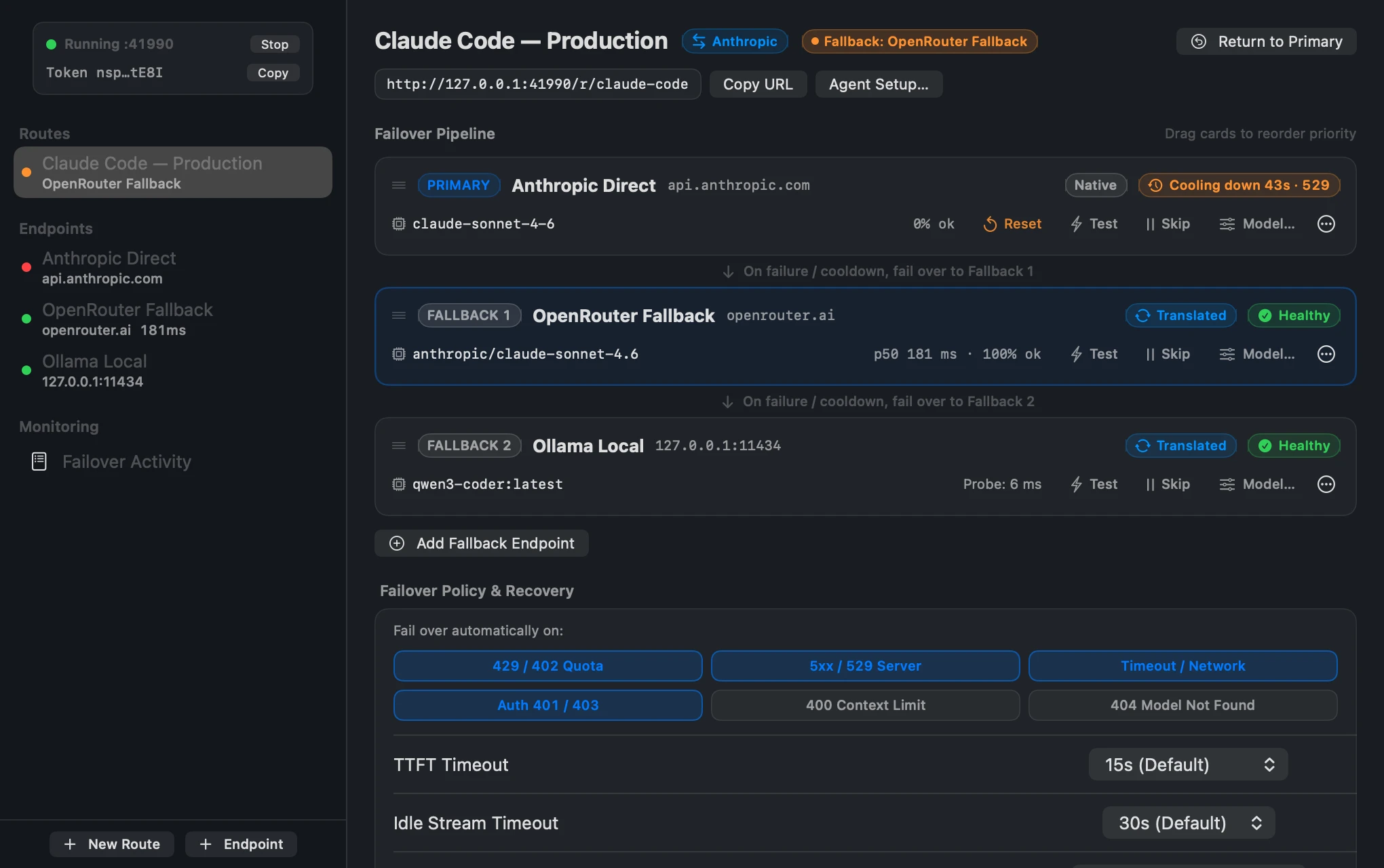
Point Claude Code or Codex at one local address on your Mac. When your primary provider hits a rate limit, overloads, or stalls, Netspector flips smoothly to your backup model—or local Ollama—and keeps streaming.
Most desktop proxies force a root certificate onto your Mac, break open every TLS session, and slow down every gigabyte you download. Netspector refuses that trade: it inspects only the opening four kilobytes of metadata in RAM, makes an instant verdict, and gets completely out of the way.
Even modern HTTP/3 QUIC traffic—where ordinary socket monitors go blind—is classified on the spot to surface the destination hostname while your encrypted payloads stay strictly private.
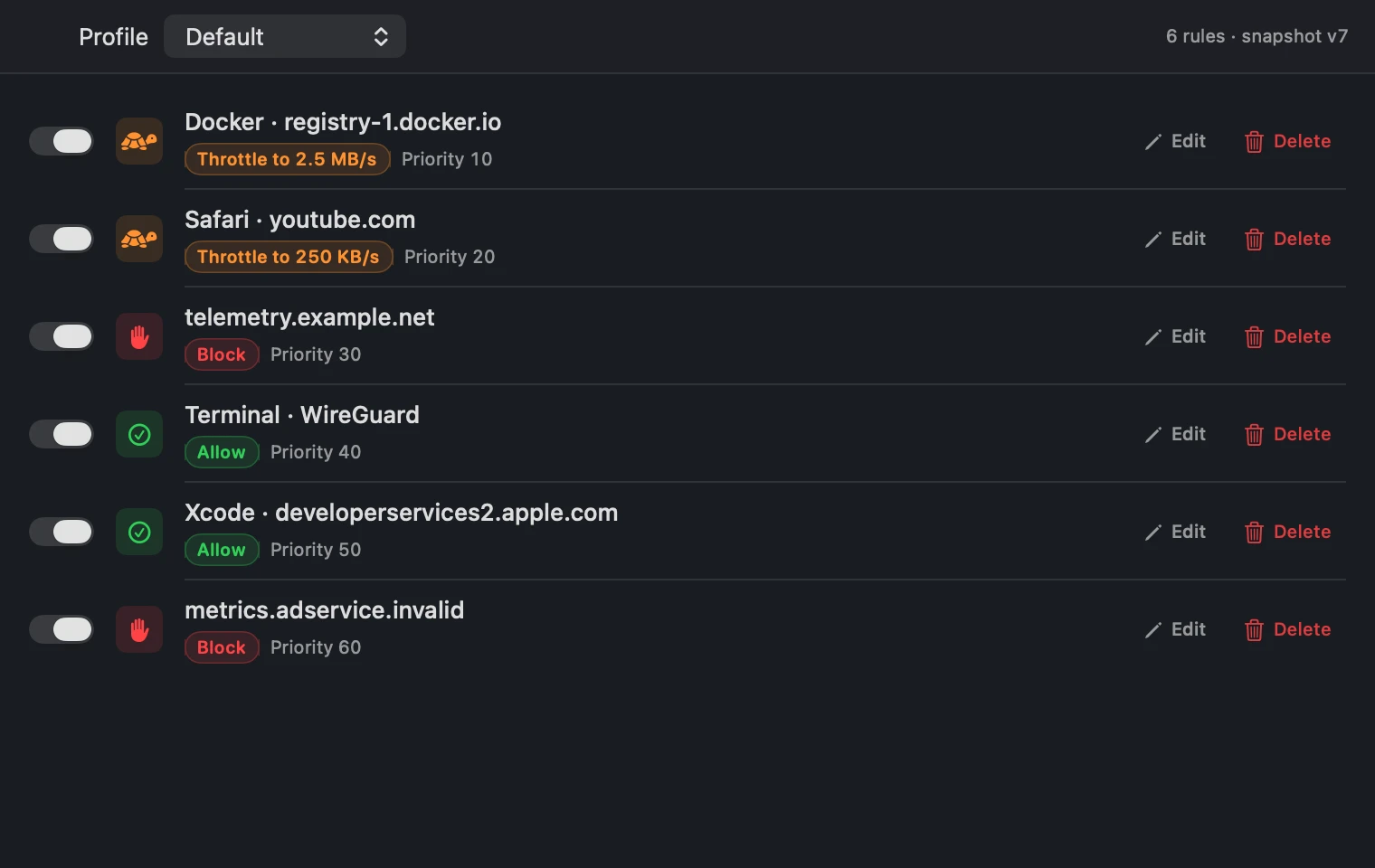
Traditional firewalls force an ugly choice: let a background download choke your Wi-Fi or kill the socket outright. Netspector paces noisy apps and domains smoothly to an exact kilobyte or megabyte speed limit without breaking active connections.
Even better: unthrottled apps never even pass through the pacer—so your video calls, terminal sessions, and code pushes run at full wire speed.
Point Claude Code or Codex at one local address on your Mac. When your primary API returns 429 or 529, Netspector flips smoothly to your backup provider—or local Ollama—translating Anthropic ↔ OpenAI streams on the fly while your keys stay locked in Apple Keychain.
Claude Code (~/.zshrc or project shell) — bash
sudo. Zero cloud.Need packet evidence for a bug report? Select any connection in the Inspector and export a standard .pcapng file straight to your own folder—already annotated with the app name, process ID, and hostname. No terminal flags, no sudo.
Under the hood, Netspector separates fast inspection from selective pacing inside signed macOS network extensions, while your rules, history, and API keys stay exclusively on your Mac.
Built on native macOS network extensions and local loopback routing—no root certificates, no remote relays, and no hard connection cutoffs.
| Capability | Netspector | Binary Firewalls | Quota Cutoffs | Cloud AI Routers |
|---|---|---|---|---|
| HTTP/3 QUIC SNI & 13+ protocols without a root CA | Yes, zero root CA | App & DNS only | Usage counters only | N/A |
| Smooth per-app & per-domain speed limits (KB/s & MB/s) | Smooth TCP & UDP | Allow / Block only | Hard cutoff at cap | N/A |
| Zero-overhead fast path for unthrottled apps | Full native speed | Varies | N/A | Remote hop |
| Zero-sudo per-app .pcapng export with app & hostname tags | 1-click export | No | No | No |
| Local 127.0.0.1 AI failover & Anthropic <-> OpenAI translation | Local & Keychain-backed | No | No | Prompts leave your Mac |
| Developer servers, remote logging, or analytics | Zero servers | Local | Varies | Third-party cloud |
Everything Netspector inspects—and everything it never touches—explained plainly.
No. Netspector creates no VPN tunnel and routes zero traffic through any remote server. All inspection, firewall rules, and bandwidth pacing happen strictly on your Mac inside signed macOS network extensions.
Never. Netspector reads only the initial cleartext metadata bytes (≤4 KB)—such as TLS SNI, HTTP Host headers, and QUIC Initial SNI—in RAM to identify the app and destination. Your encrypted traffic remains completely untouched.
No. Once a connection is allowed, Netspector steps out of the data path so bulk downloads run at native kernel speed. Unthrottled apps bypass the bandwidth pacer completely with zero extra copying.
The optional AI Failover Gateway listens exclusively on localhost (127.0.0.1 and ::1), rejects browser cross-origin requests, and requires a local token stored in Apple Keychain. Your provider keys stay in Keychain, prompts and responses are never written to disk, and traffic goes directly from your Mac only to endpoints you explicitly configure.
macOS requires your explicit consent before activating any third-party network extension. On first launch, Netspector's Setup Assistant walks you straight to System Settings → General → Login Items & Extensions → Network Extensions and advances automatically as soon as you switch it on.
Netspector is engineered fail-open: if an inspection timeout or edge-case handshake ever occurs, the connection is allowed immediately so your internet access is never interrupted.
Requires macOS 14.0 Sonoma or later. Universal app for Apple Silicon and Intel. Zero accounts, zero tracking, zero remote servers.